QABILL
Menu

See the order. Move the stock. Catalogue the truth.

Five things run a small business: what you sold, what you bought, what is in stock, what went out, and what the GST return says. Here is how each one looks.

Order management and tracking, kept simple.

  • One card per order, showing where it has reached — confirm, pack, ship, deliver
  • Click an order: header, payments, then the items table
  • Pack from the same order — mark packed and ship when stock is on hand

So nobody has to ask the warehouse what is packed.
Card list → click order → scroll items → Pack
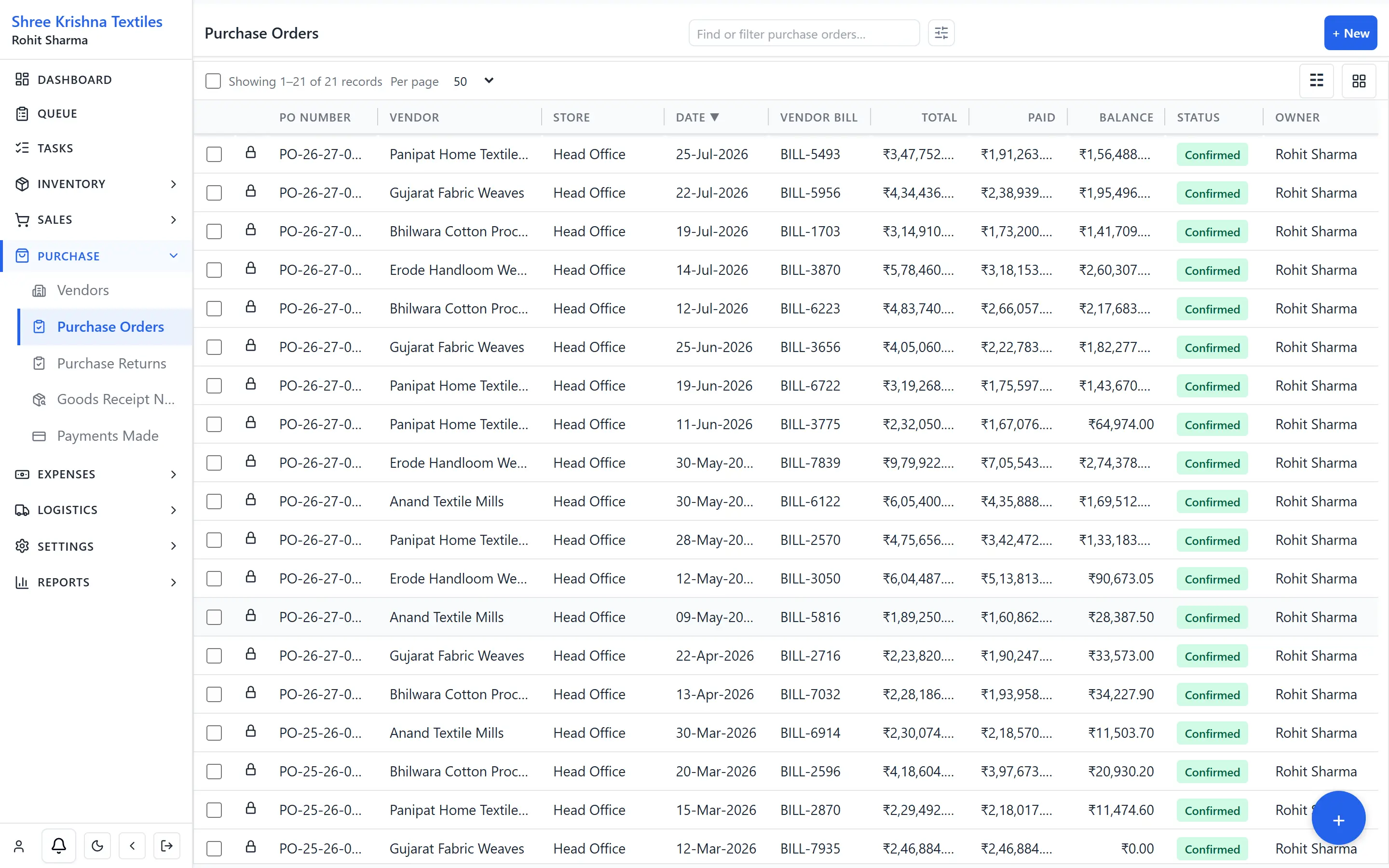
Purchase orders list for Shree Krishna Textiles with vendors, dates and totals
Purchase orders · vendors, dates, totals

Buying, all the way to the vendor bill.

  • Purchase order → goods receipt (GRN) → vendor bill → payment → return
  • Receive short or in parts — the goods receipt records what actually arrived
  • Each item carries the vendor’s own code and rate

So a short delivery is caught at the gate, not at month end.

One inbox for what is still open.

  • Tasks, packs, approvals and shipments in one inbox
  • Open a task: due date, priority, linked order, Complete
  • Pack jobs sit in the same list — not a side spreadsheet

So “what is pending?” has one answer, not six menus.
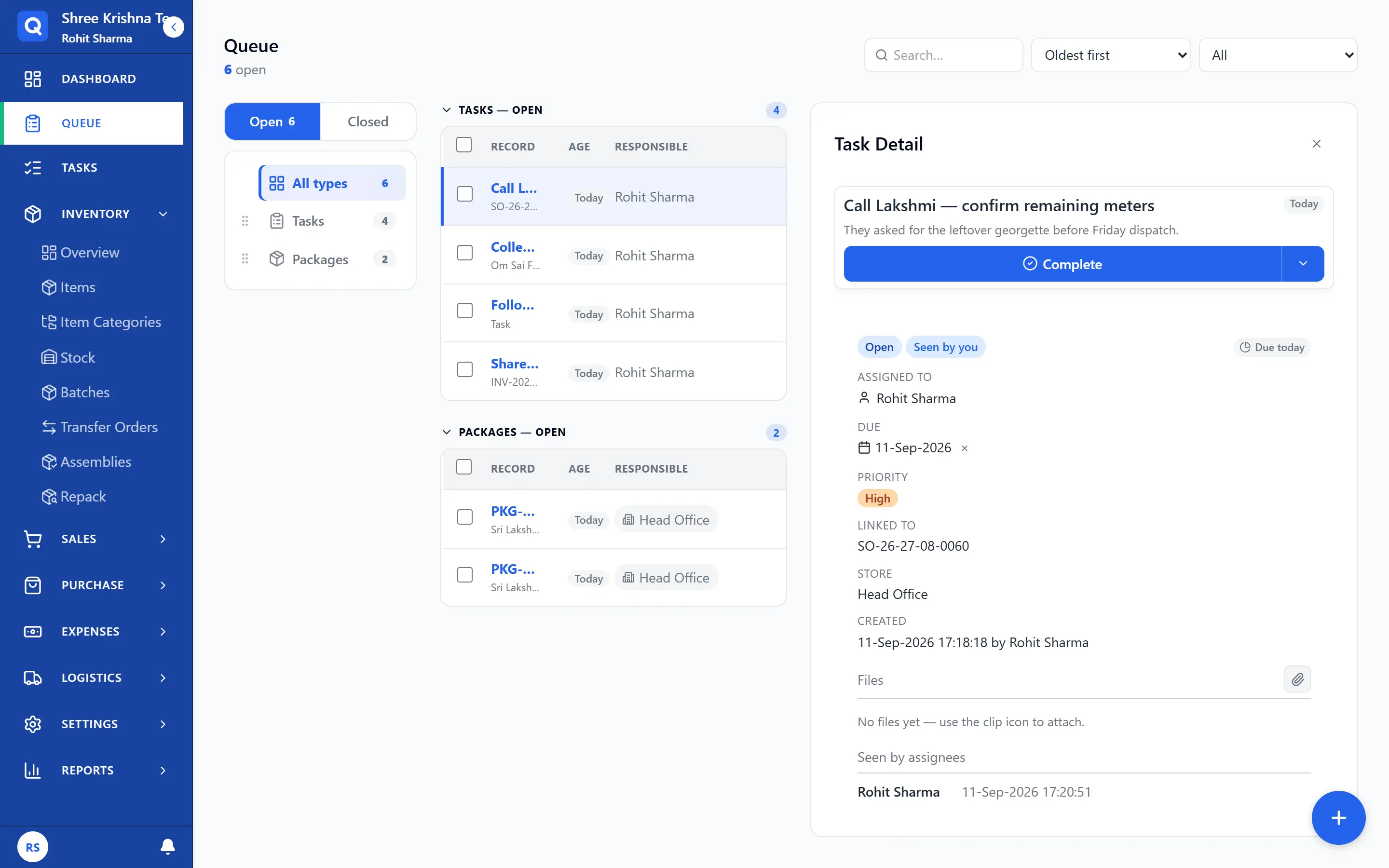
Work queue with tasks and pack jobs, a follow-up task selected
Queue · All types · task selected

TO-2026-0148

Head Office → Andheri Godown

9 Aug 2026 · 24 lines · 180 m

In transit
Step 3 of 4

Receive at destination

Timeline ▴

Progress

  1. Confirm
  2. Dispatch
  3. In transit
  4. Receive
Transfer card · progress steps (confirm → receive)

Transfers in the same card language.

  • From location, to location, qty, receive status
  • Latest movements first — not a buried table row
  • Dispatch and receive without a second tracker

So stock in transit is never counted twice.

Stock you can actually sell from.

Availability is held per location — a shop and a warehouse are not one pile. Reserved quantity on confirmed orders comes off what you can promise.

By location

Business and Storage locations each hold their own stock.

Variants and packs

Colour × size SKUs, and multiple pack sizes on one item.

Assemblies

Build a finished SKU out of components.

Batches and serials

Track by batch or by serial where the item needs it.

Items that match how you actually sell.

  • Create the catalogue — variants, packs, assemblies, and each vendor’s code and rate on the same item.
  • Insights on every line — select the customer, select the item: last rate, last qty, that customer’s average, and the shop’s overall average.
  • Dealers and walk-in — same sales-order screen for a B2B party and a counter name. New walk-in still sees the overall average.
  • Bring your list — import items, customers and vendors from Excel and map your own column names once.

So the rate you quote is the rate you quoted last time — on purpose.

Who sees what, and who signs off.

A packer does not need your margins, and a discount past a limit should need a yes.

Roles and permissions

Per-module view, create and edit rights for each role you define.

Approvals

Route the documents you choose through an approval before they go live.

Shared-device login

On paid plans, staff share one phone at the counter without sharing one identity.

GSTR-1 without the Excel week.

Named reports: GSTR-1, GSTR-3B, GST by rate, HSN (item codes), purchase / ITC (input tax credit). GSTR-1 also downloads as portal-ready JSON. Your CA files. We do not push to the GST portal or issue e-invoice IRNs.

So month end is a download, not a week of reconciliation.

No card · Cancel anytime · Set up in two minutes

Give it one busy week.

No card · Cancel anytime · Set up in two minutes