Menu

Billing · Stock · Purchases · GST — for small Indian businesses

Run the shop. Not the software.

Most billing apps stop at the invoice. QABILL keeps going — stock, purchases, dispatch, and the GST reports your CA asks for. One app, on your phone.

No card · Cancel anytime · Set up in two minutes
  • Built for GST
  • Hosted in India
  • 14-day trial
  • No card
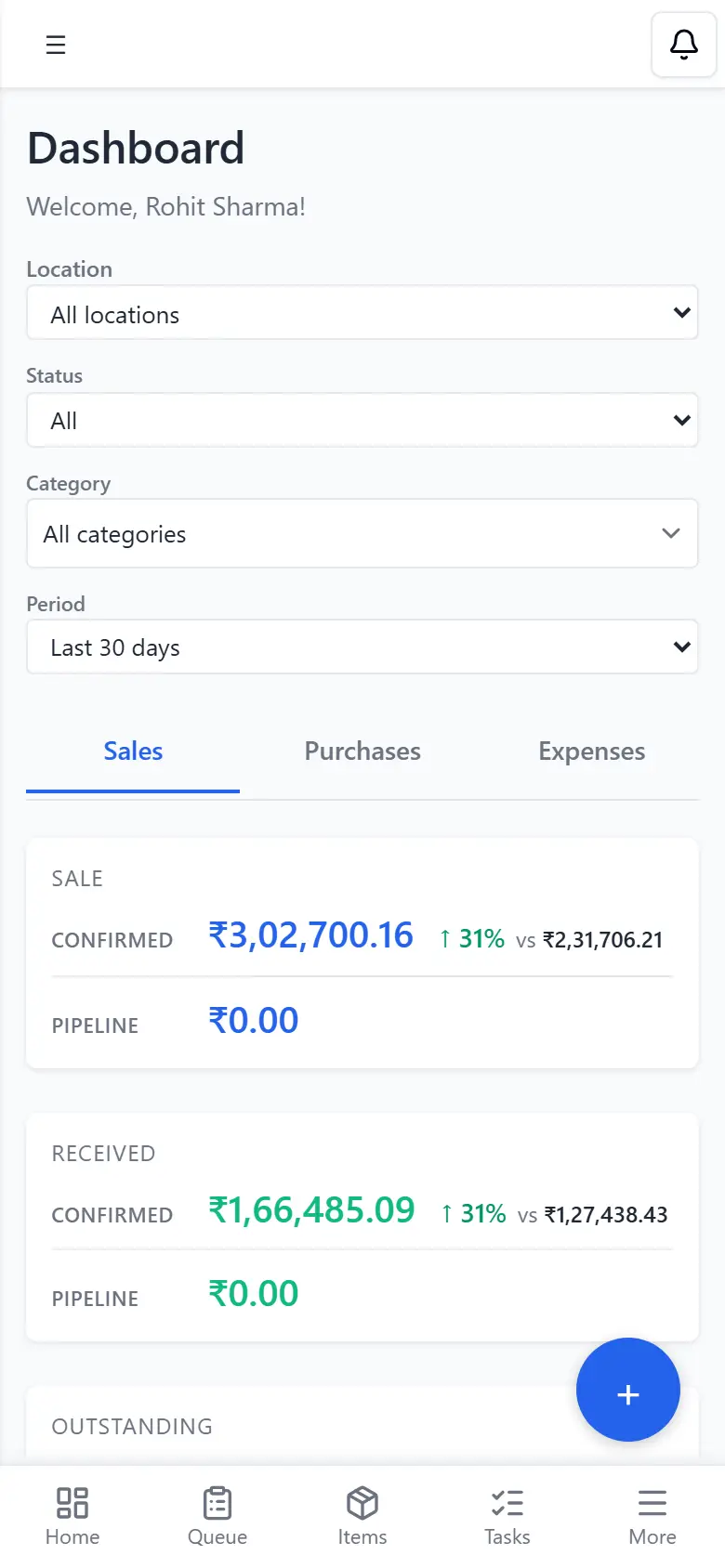
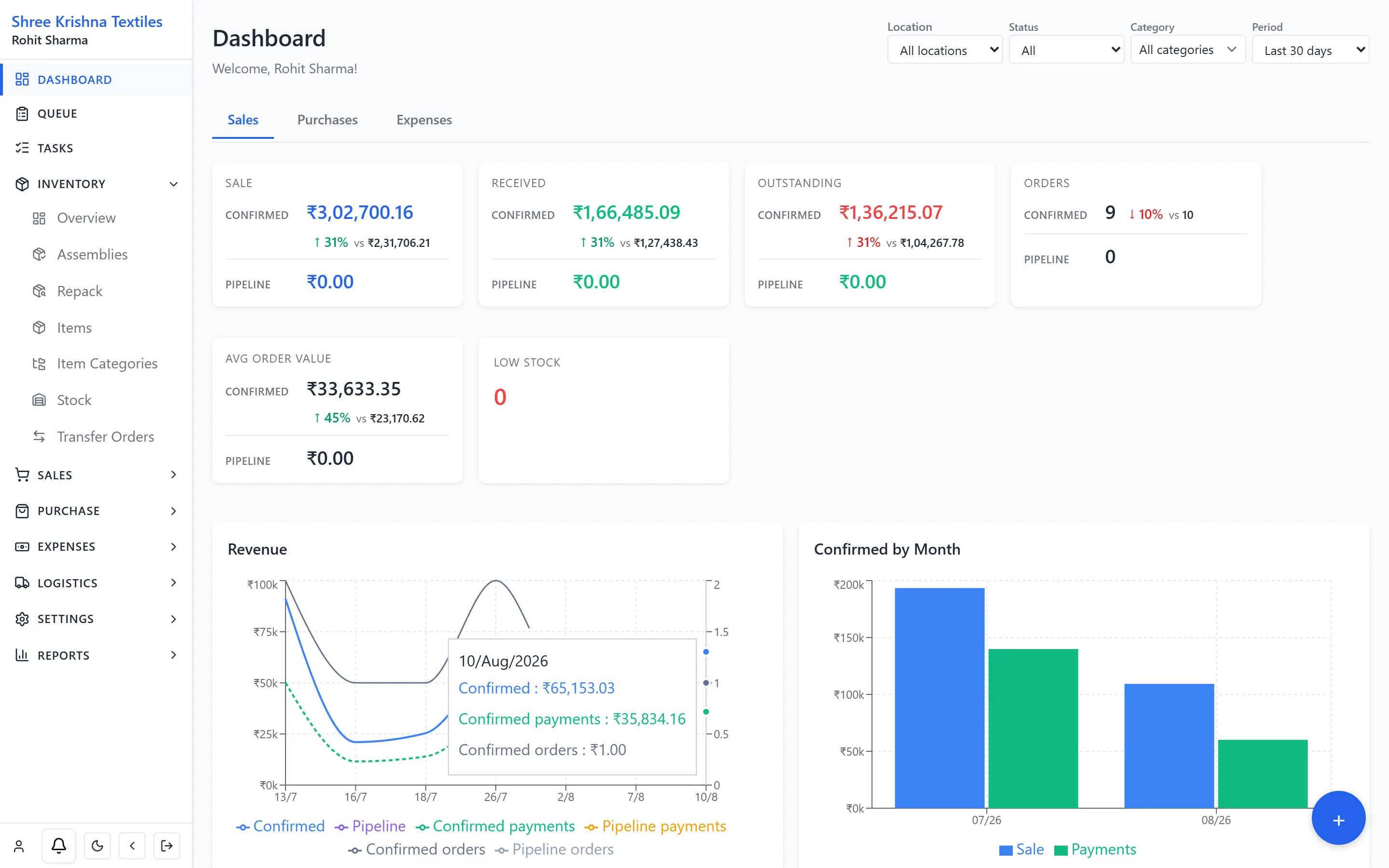
QABILL dashboard on a phone showing confirmed sales and receipts
  • Hosted in India

    Mumbai region

  • 14-day trial

    No card, no sales call

  • Cancel anytime

    No lock-in contract

  • Your data, exportable

    Full account backup, any time

  • Payments by Razorpay

    GST invoice for every charge

You are running three businesses. Only one of them pays you.

Notebooks and WhatsApp

The warehouse answers “what is packed?” in a group chat. Nobody trusts the number.

Tally for the CA

Filing happens. The shop floor still cannot see stock, pending packs, or who owes what.

A billing app that stops

Invoice done. Goods receipt, transfer, dispatch and GST reports live somewhere else — or nowhere.

Billing by this afternoon. Not next quarter.

No implementation project, no consultant, no data-entry team.

  1. 01

    Sign up with your mobile number

    Verify by OTP, name the business, and you are in. The 14-day trial starts immediately and never asks for a card.

  2. 02

    Bring your lists in from Excel

    Items, customers and vendors import from a spreadsheet — map your columns once and it remembers them. Opening stock goes in with the item.

  3. 03

    Put the floor on it

    Invite staff so each person sees only their work. Bill from the counter, pack from the order, and hand your CA the GST reports at month end.

One app, five workflows

Sell → Buy → Stock → Dispatch → File GST

Sell — the simplest order tracking

Open the card and you see where the order has reached — confirm → pack → ship → deliver — what has been paid, and the items on it. No spreadsheet to find out what is packed or what is still owed.

TO-2026-0148

Head Office → Andheri Godown

9 Aug 2026 · 24 lines · 180 m

In transit
Step 3 of 4

Receive at destination

Timeline ▴

Progress

  1. Confirm
  2. Dispatch
  3. In transit
  4. Receive
Transfer card · progress steps (confirm → receive)

Move — transfers you can actually receive

From location, to location, qty, status — same card layout as sales. Dispatch and receive without a side tracker.

Buy

Purchase order → goods receipt (GRN) → bill → vendor pay → return.

Stock

What you can sell today, by location.

File GST

GSTR-1, GSTR-3B, HSN and ITC — reports, not a checkbox.

Items that match how you actually sell.

Catalogue once — variants, packs, assemblies (a finished SKU from components), vendor rates. Then on every sales order, pick the customer and the item: last rate, last qty, that customer’s average, and the shop’s overall average sit on the line. Same for a dealer book and a walk-in at the counter.

  • Create the item right

    Sizes, colours, packs, assemblies — a finished SKU from parts.

  • Insights on the line

    Customer selected + item selected. History is on that row.

  • B2B / dealers

    Last purchase rate and qty for that party, before you type a number.

  • Retail / walk-in

    New counter name still sees the shop’s overall average for the item.

Already have the list in Excel? Import items, customers and vendors and map your own columns.

One inbox. Every pending thing.

Tasks, packs, approvals, shipments — not six menus and a phone call.
  • Tasks
  • Packs
  • Approvals
  • Shipments
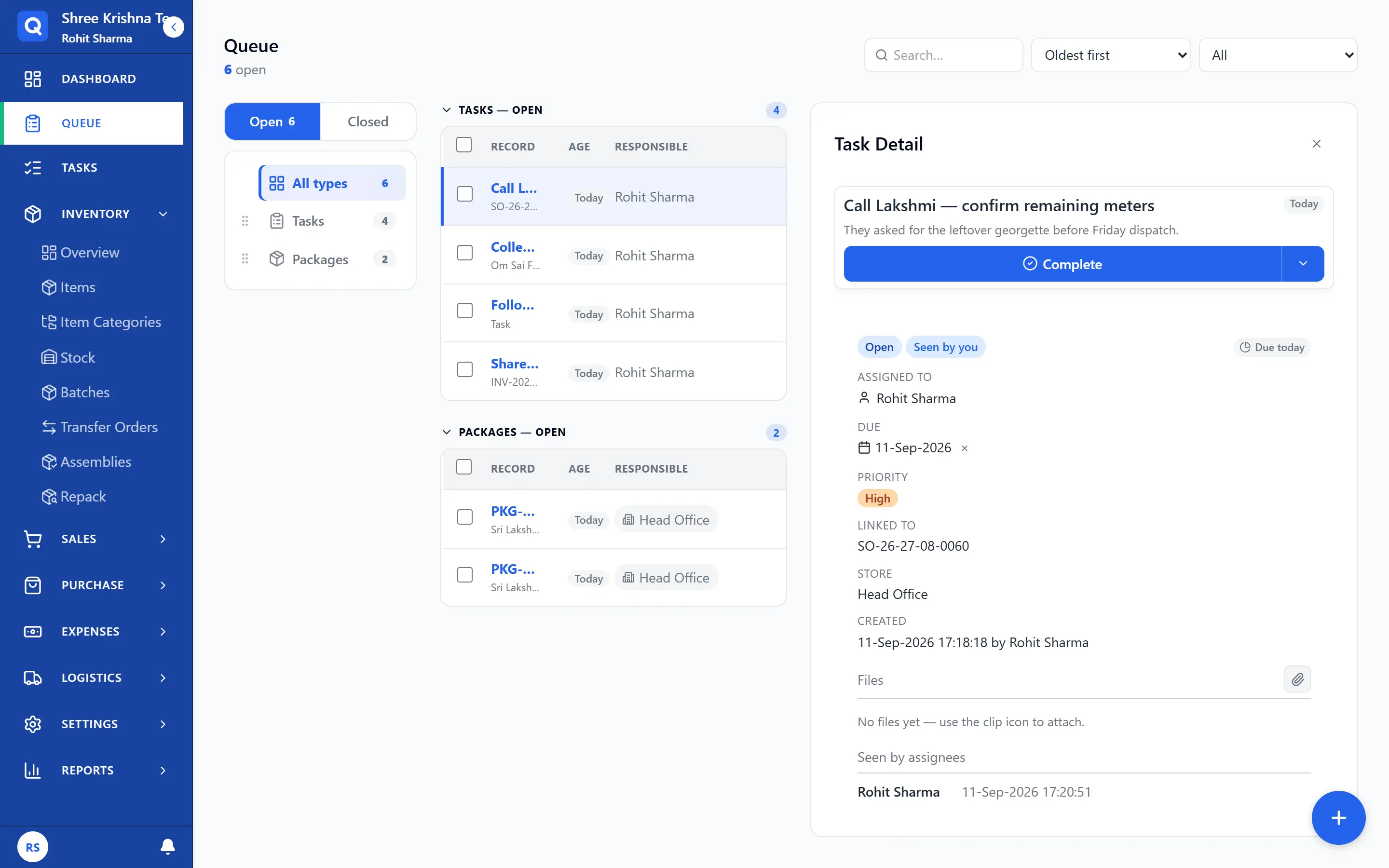
Work queue with tasks and pack jobs open, a follow-up task selected
Queue · tasks and packs in one inbox · task selected

GST that is a report, not a promise.

Give your CA a file. Keep the business on your phone. GSTR-1 also downloads as portal-ready JSON.

  • GSTR-1 (outward)
  • GSTR-3B summary
  • GST by rate
  • HSN summary (item codes)
  • Purchase / ITC (input tax)
  • GST summary

What QABILL replaces — and what it does not.

You should know the edges before you pay us, not after.

Replaces

  • The WhatsApp group that answers “what is packed?”
  • The stock notebook and the side Excel for pending payments
  • A separate tracker for transfers, dispatch and lorry receipts
  • The month-end GST working file built by hand

Works alongside

  • Your CA and the software they file from
  • GSTR-1 and GSTR-3B handed over as reports
  • GSTR-1 also downloads as portal-ready JSON
  • Your bank, UPI and existing payment habits

We do not do

  • File returns on the GST portal for you
  • Generate e-invoice IRNs
  • Replace your accountant’s books
  • Lock your data in — export whenever you want

Built past the invoice

Order cards

Latest sales orders in card view — status and tracking at a glance.

Transfer cards

Same layout for stock moving between locations.

Variants and packs

Multi-variant items and multiple packages on one catalogue.

Assemblies

Make a finished SKU from components.

Vendor codes and rates

Supplier code and rate per item, per vendor.

Goods receipt and print studio

What arrived, and documents that look like your shop.

The awkward bits, built in

Not a generic ERP with your trade pasted on the box — these are the things a billing app usually skips.

Variants and packs

Sizes, colours and pack sizes sit under one item, instead of twenty look-alikes in your list.

  • Colour × size grid
  • Multiple pack sizes
  • Stock for every variant

Batch and expiry

You need to know which lot is on the shelf, and when it goes off.

  • Batch tracking
  • Shelf life on the item
  • Sell from the right lot

Serial numbers

Each unit has a unique identity you have to follow through sale and return.

  • Serial on the item
  • Follow it on invoices
  • Returns against the serial

Service items

You bill work as well as goods, and it should not pretend to have stock.

  • Service kind on the item
  • No stock, batch or serial
  • Same invoice as goods

Assemblies

A finished SKU is made from components, and stock should come off the bits.

  • Bill of materials
  • Build from components
  • Stock of the finished SKU

Stock across locations

Shop and warehouse are not one pile, and stock in transit should not count twice.

  • Stock by location
  • Transfers you confirm and receive
  • One owner view

Optional · on Business, or add to Growth

Let dealers order without another WhatsApp catalogue.

Share a catalogue, take quote requests, let them track the order. It is a second product inside the first — turn it on when the ops side is already running, not on day one.

Ask about the storefront

From ₹41 a day, billed yearly

Growth is where most teams start. The trial gives you Growth features for 14 days, with no card.

Need one more person or one more location? ₹499/mo each (₹4,990 yearly). Prices exclude GST.

Starter

One counter, 1–2 people

₹1,249/mo

About ₹41 a day

Billed ₹14,990 yearly

You keep ₹2,998 a year

2 seats · 1 location (shop or warehouse)

  • Quotes, sales orders, invoices, payments
  • Items, stock, basic GST summary
  • Print studio
  • Storefront: —
  • Email
Start 14-day free trial

Most teams start here

Growth

Shop plus warehouse

₹2,916/mo

About ₹96 a day

Billed ₹34,990 yearly

You keep ₹6,998 a year

5 seats · 3 locations (shop or warehouse)

  • Everything in Starter
  • Purchases, goods receipt (GRN), bills, returns
  • Transfers, assemblies, transport / LR dispatch
  • GSTR-1, GSTR-3B, HSN and ITC reports
  • Control what staff can see and change
  • Storefront: Add-on ₹1,499/mo
  • Email + WhatsApp
Start Growth free for 14 days

Business

Multi-branch + dealers

₹6,666/mo

About ₹219 a day

Billed ₹79,990 yearly

You keep ₹15,998 a year

15 seats · 5 locations (shop or warehouse)

  • Everything in Growth
  • Dealer storefront
  • Priority onboarding
  • Storefront: Included
  • Named onboarding
Start 14-day free trial

Need only billing for now? Stay on Free after the trial: 1 user, 1 location, 15 invoices a month, GST summary only. Purchases, transfers, dispatch and GST file export unlock on a paid plan.

See the full comparison and pricing FAQ

Questions owners actually ask

Is this Tally?
No. QABILL runs the floor — orders, stock, packing, dispatch, payments — and produces GST reports from that activity. Your CA keeps filing. You get GSTR-1 and GSTR-3B-ready numbers on your phone.
Can I bring my existing data in?
Yes. Items, customers and vendors import from an Excel sheet — you map your columns once and QABILL remembers the mapping. Opening stock goes in when you create the item. You do not have to re-enter your catalogue by hand.
How long before we are actually using it?
Signup takes a couple of minutes. Most of the setup time is your item list, which is why the Excel import exists. Start billing the same day and add purchases, transfers and dispatch as you need them.
Do I need a card to start?
No. The 14-day trial does not collect payment. You are charged only if you subscribe.
What happens on day 15?
Subscribe to keep working. If you do not, the account moves to Free — 1 user, 1 location, 15 invoices a month, GST summary only. Your data is not deleted because the trial ended.
Does it work on a phone, and does it need internet?
It runs in the browser on any phone — nothing to install. It does need a working connection, because stock and orders are shared live across your team.
Is the app in Hindi?
The screens are in English today. They are built for a busy counter, so most of the work is tapping, not reading. Hindi UI is not available yet.
Can staff use it on one shared phone?
Yes, on paid plans. Shared-device login is built in, and roles limit what each person can see or change. Extra people beyond the plan seats, and extra locations beyond the plan, are ₹499/month each. Free is one named login.
I have a shop and a warehouse. Does that work?
That is the normal case. Locations come in two types — Business (a shop or office) and Storage (a warehouse) — with stock held per location and transfers you confirm and receive. Growth includes 3 locations, Business includes 5, and more are an add-on.
Is my data mine? Can I get it out?
Yes. You can download a full backup of your account from Settings whenever you want, and cancelling does not delete your data. Reports export as files you can hand to your CA.
Do you file GST or do e-invoicing?
We produce GSTR-1, GSTR-3B, HSN (item-code) and ITC (input tax credit) reports, and GSTR-1 also downloads as portal-ready JSON. We do not file on the portal and we do not generate e-invoice IRNs.

Still deciding? Tell us what you run and we will tell you straight whether QABILL fits.

Give it one busy week.

QABILL se kaabil bano.

No card · Cancel anytime · Set up in two minutes